
Patreon integration for tier-weighted votes
Connect Patreon to Featurevote so patrons log in, their votes count by tier, and the board can be open to patrons only.
Connect your Patreon campaign to featurevote and your patrons can log in with Patreon on your Feedback Portal. Their votes carry the weight you give their tier, and you can close the board so only patrons take part. The integration is part of every plan — plan limits apply to the board itself, not to Patreon.
Watch the Setup Tutorial
This 32-second walkthrough begins after a campaign is connected and shows participation settings, tier vote weights, and patron access. It uses a fictional campaign with seeded membership in an earlier layout; real Patreon login and connection are not demonstrated. English captions are included. Follow the written steps below to connect your campaign.
What You'll Get
- Weighted votes — a vote from a higher tier counts for more. You set the multiplier per tier, from ×1 to ×100.
- Patrons only — an optional gate. When it's on, only active patrons can vote, suggest features and comment.
- Verified identity — patrons log in through Patreon, so a request or comment on a gated board carries their Patreon name instead of "Anonymous".
- Non-patrons hidden or visible — let anyone read the board, or show it only to patrons.
Connect Your Campaign
1. Connect Patreon
- Go to Settings → Integrations
- Click Connect Patreon
- Authorize featurevote on Patreon
Log in on Patreon as the account that owns the campaign. A Patreon account without a campaign has nothing to connect, and the page comes back with an error.
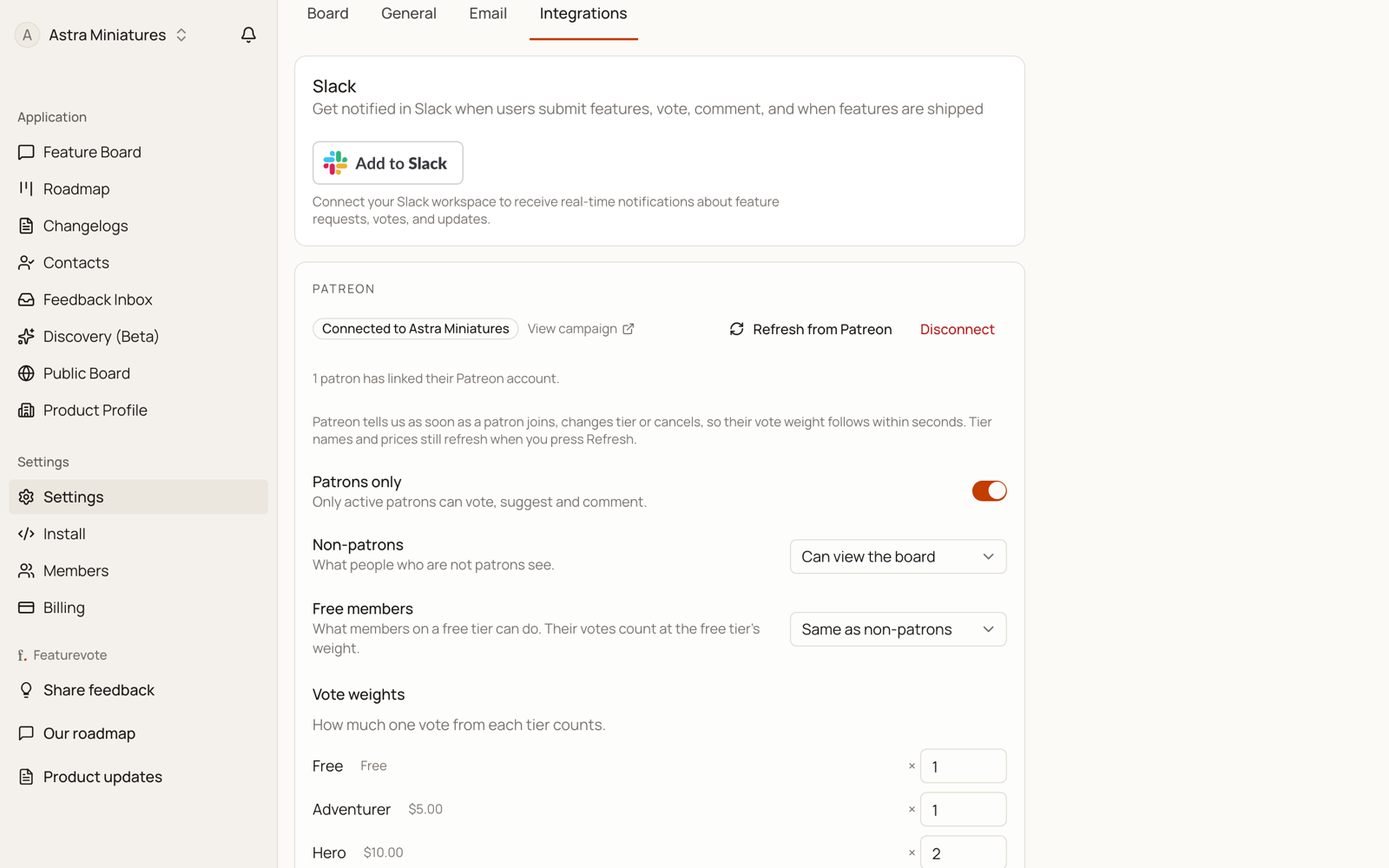
When it works you land back on the Integrations page with the Patreon row open. The row says Connected to and names your campaign, and a View campaign link sits under it.
2. Set your vote weights
Your published tiers appear under Vote weights, each with its price and a multiplier box.
Paid tiers start at ×1, ×2, ×3 by price, cheapest first. A free membership tier starts at ×1. Change any of them to whatever you want between 1 and 100.
3. Choose who can take part
Three settings sit above the weights:
| Setting | What it does |
|---|---|
| Patrons only | Off by default. When on, only active patrons can vote, suggest and comment. |
| Non-patrons | Can view the board (default) or Cannot view the board. Only applies while Patrons only is on. On Cannot view, a non-patron sees a lock screen instead of the board. |
| Free members | Same as non-patrons (default) or Same as paying patrons. Free members' votes count at the free tier's weight, whatever you set it to. |
4. Save
Make your changes and click Save. The button stays greyed out until something has actually changed.
Weight changes apply to patrons who are already logged in, so you don't have to ask anyone to sign in again. They apply to future votes only — votes already cast keep the weight they were cast at.
What Your Patrons See
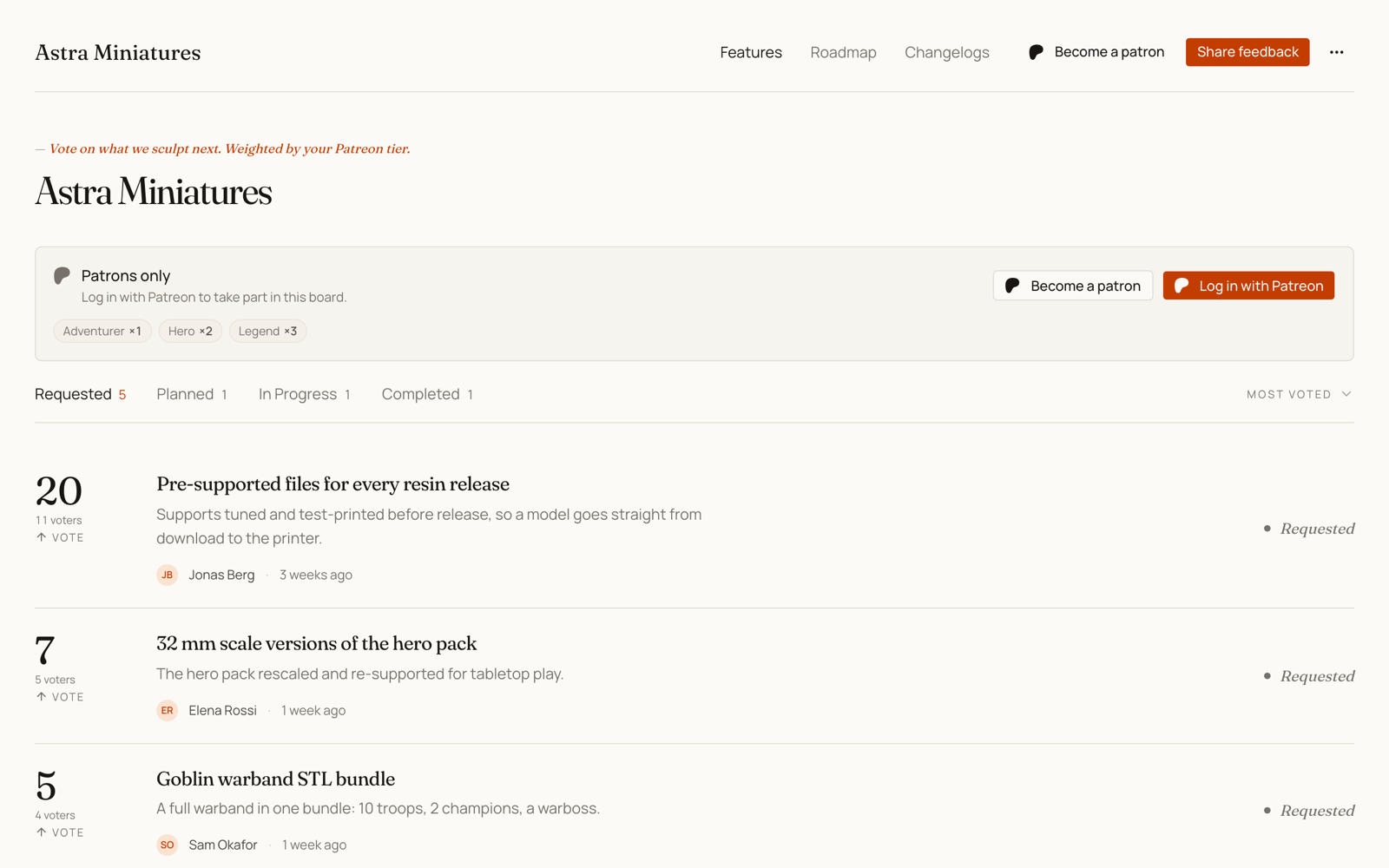
On a board with Patrons only on, a visitor who isn't signed in gets a Patrons only panel with a Log in with Patreon button, and a Become a patron link to your campaign. They can still read the board behind it — unless you set Non-patrons to Cannot view the board, in which case the requests are replaced by a short lock screen and the same login button.
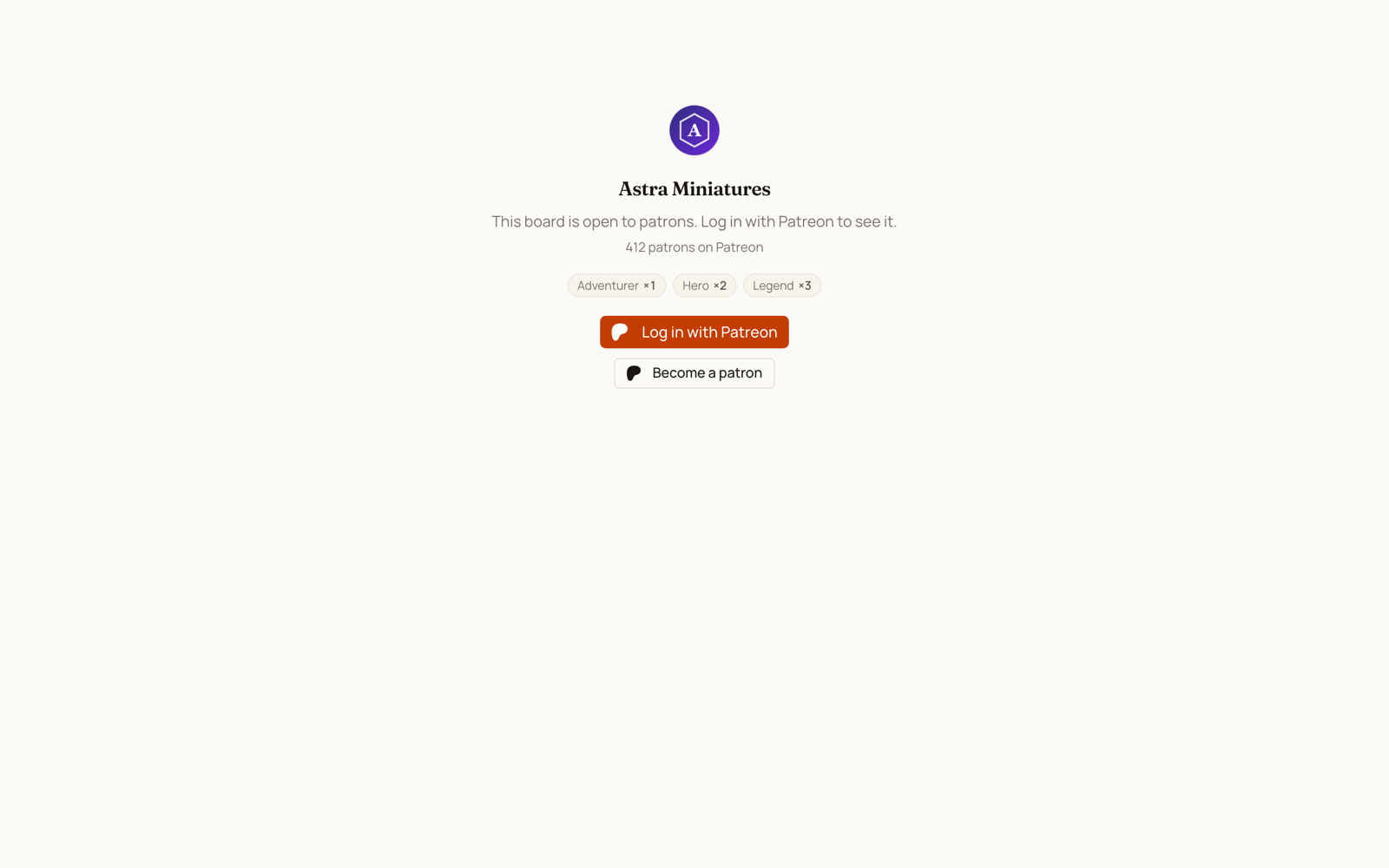
The lock screen also carries your campaign's face: your Patreon avatar and patron count appear on it, refreshed whenever you connect or press Refresh from Patreon. The avatar is copied to featurevote's own storage at that moment, so it keeps working even though Patreon's image links expire.
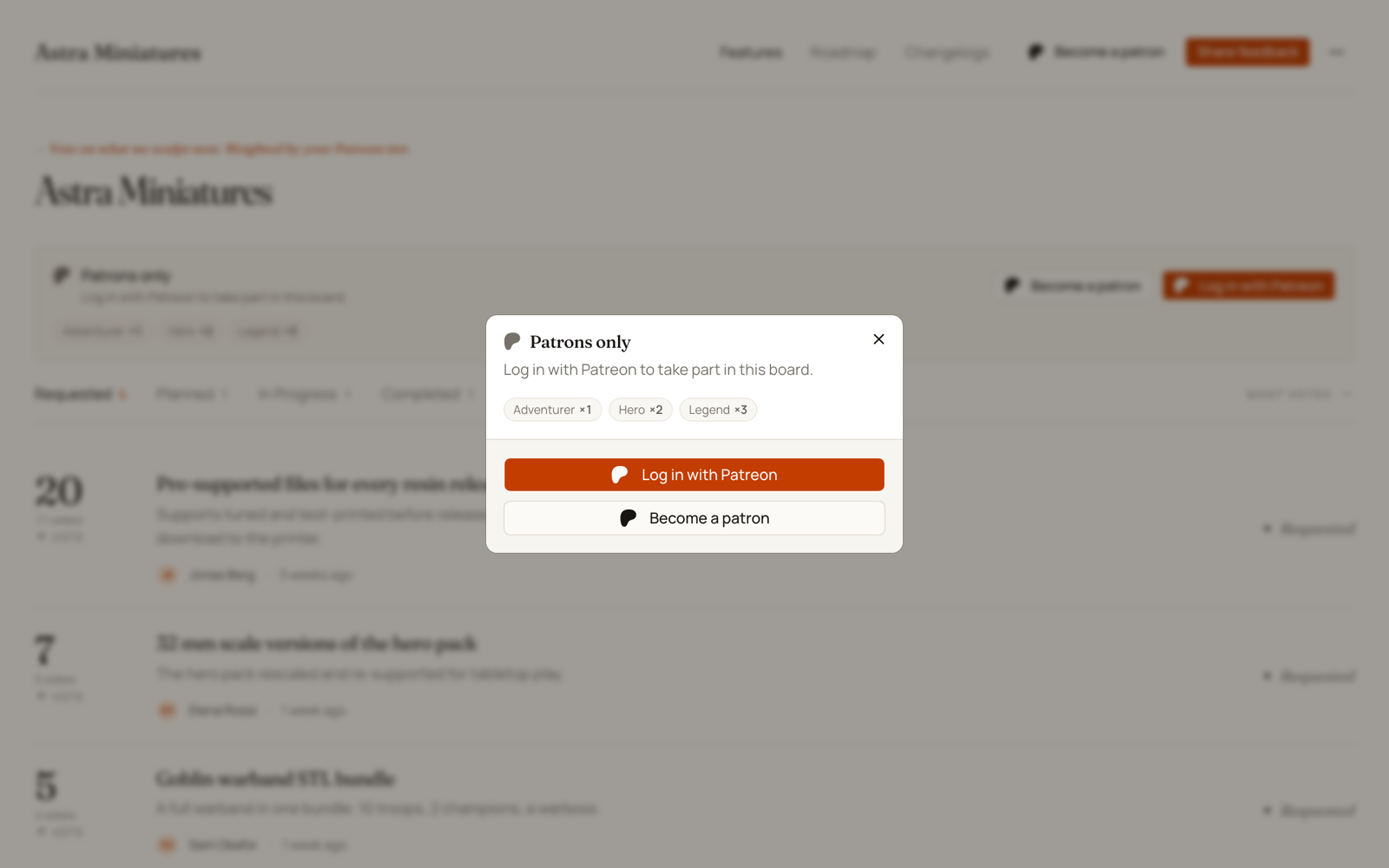
If they click a vote button (or try to suggest or comment) without signing in, a small dialog explains the board is for patrons and offers the same two actions — nothing happens to their click until they choose. Nobody is sent to Patreon just for clicking an arrow.
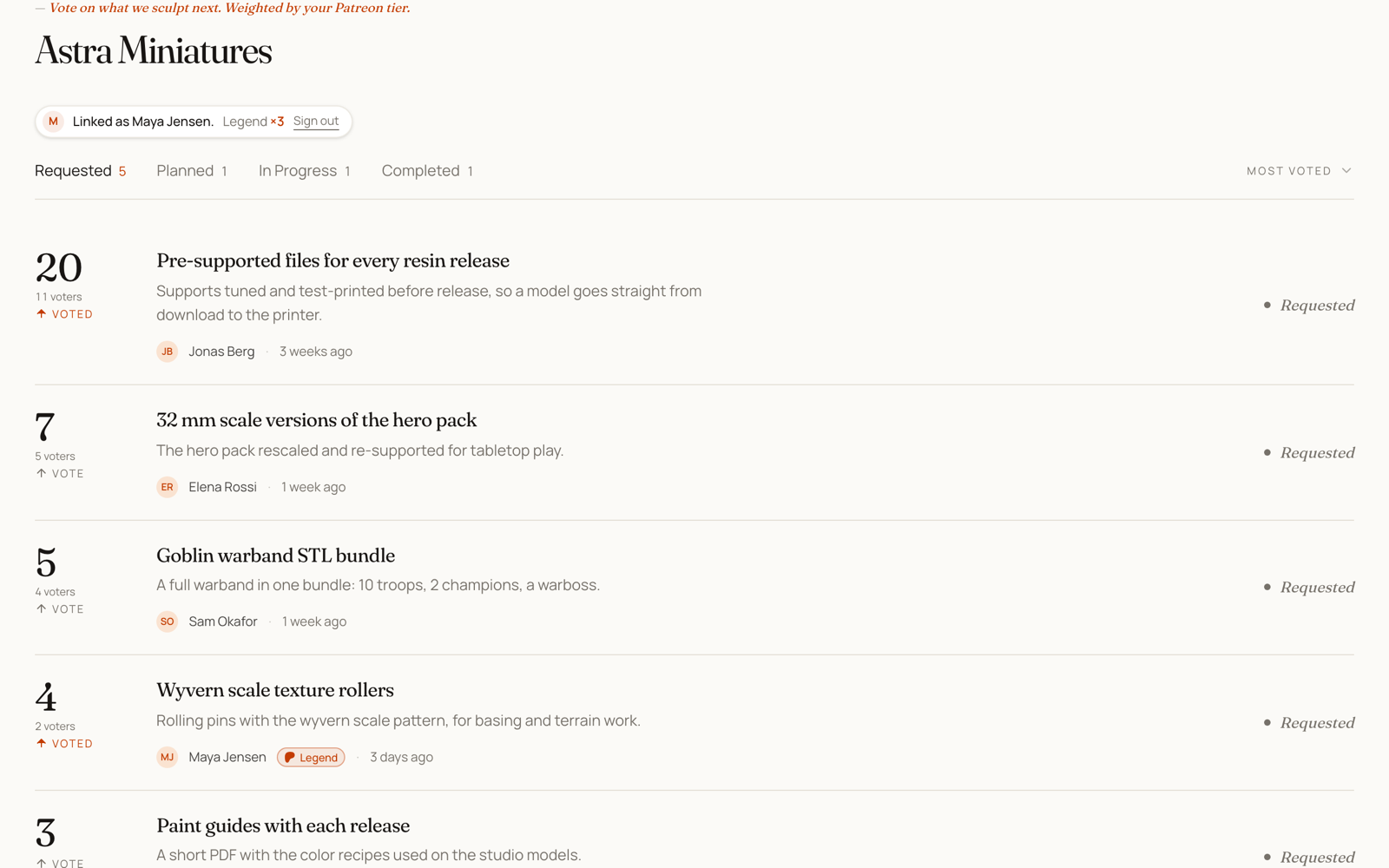
Once they're signed in, the panel is replaced by a small chip: "Linked as Marcus.", their tier, and a "Vote counts ×3" pill that opens the tier ladder when tapped.
On a gated board, a patron's requests and comments also carry a small tier badge next to their name — "Marcus · Gold" — so everyone can see that paying supporters are active. The badge shows only for patrons who posted on that board, only their tier (never the weight), and it disappears if their membership lapses.
A member on a free tier, on a board set to Same as non-patrons, gets the same panel with a different line: they're signed in, but the board is open to paying patrons only. There's no login button for them, since logging in again wouldn't change the answer — only upgrading on Patreon does.
A few things worth knowing:
- A Patreon login counts for 30 days on a gated board. After that the patron logs in again to keep taking part.
- On a gated board, patrons post under their Patreon name and aren't asked for an email. You won't collect submitter email addresses for those requests, because the Patreon identity replaces them.
- Your own team can suggest and comment on a gated board without being patrons. Voting has no team exemption — to vote on your own gated board, log in with Patreon like anyone else.
- A creator can always open their own board, even when it's hidden from non-patrons.
- With Patrons only off, anyone can take part without logging in. If any tier is weighted above ×1, the board still offers Log in with Patreon so patrons can claim their weight, and patrons who linked their account earlier keep voting with it.
How the Numbers Read
The number on a feature card is points — the sum of the weights behind it. Three ×3 patrons make 9 points, not 3.
- When points and people differ, the card also says how many voters there are, so 9 shows with a 3 voters caption. On desktop, hovering the caption spells out that votes on the board are weighted.
- A patron's own request starts at their own weight — a ×3 patron's new suggestion opens at 3 points, the same as their vote anywhere else.
- Most Voted sorts by points, on your Feedback Portal and in your admin list.
- Vote milestones in Slack still count people. "25 votes" in your Slack channel means 25 voters, not 25 points, so a milestone can arrive later than the board number suggests.
A board with no Patreon weighting reads exactly as it always did.
Keeping Things in Sync
Patreon tells featurevote when a membership changes, so a patron who upgrades, downgrades or cancels has their vote weight follow within seconds. They don't have to log in again for it to take effect.
The Patreon row says whether this is on. If it says live updates are off, click Turn on live updates and authorize again — featurevote asks for one extra permission now, and Patreon only grants permissions when you connect, so a connection made before this existed can't have it until you reconnect. Your tier weights are kept. Everything else about the integration works either way; without live updates a patron's standing is simply checked when they log in, and a login counts for 30 days.
Two things still come from a button rather than from Patreon:
- New, renamed or re-priced tiers arrive when you press Refresh from Patreon.
- Refresh from Patreon is also how you re-arm live updates if they ever stop. Patreon pauses a webhook that fails repeatedly, and Refresh turns it back on.
Refresh from Patreon keeps the weights you set. Tiers that still exist keep your multiplier, new tiers get a default, and removed tiers drop off the list.
Votes already cast keep the weight they were cast at. An upgrade changes what a patron is worth from now on, not what your board's history was.
Using Patreon Alongside Discord
You can connect Discord to the same board.
With both Patrons only and Members only on, the board shows both logins, Patreon first, and a visitor can take part if they pass either one. With only Patrons only on, only patrons can take part, and Discord just adds weight. Someone linked to both counts at the higher of their two weights.
The full rules, including who can see the board, are in Using Discord Alongside Patreon.
Disconnecting
Open the Patreon row and click Disconnect.
- Patron gating turns off.
- Tier weights stop applying to new votes.
- Votes already cast keep their weight.
Reconnecting to a different campaign clears the old campaign's patron logins, since those people aren't members of the new campaign.
Troubleshooting
- "That Patreon account has no campaign." — you authorized with a Patreon account that doesn't own a campaign, usually a personal patron account. Sign in to Patreon as the campaign owner and try again.
- "Could not connect Patreon." — something transient went wrong during the handshake. Try again; if it keeps failing, get in touch.
- "That Patreon account is not an active member of this campaign." — the patron's membership has lapsed, or they pledged to a different creator. The Become a patron link takes them to the right campaign.
- "This browser is already signed in as a different Patreon account." — one browser holds one patron identity. The message offers a Switch account button that starts a fresh login; votes cast under the previous account stay with that account.
- "Your Patreon login has expired." — it's been more than 30 days. One click on Log in with Patreon fixes it.
- A patron upgraded but still votes at the old weight — only possible when live updates are off for your connection. Turn them on from the Patreon row, or the patron can log in with Patreon again for the new tier to be read.
- A new tier isn't listed — press Refresh from Patreon. Unpublished draft tiers on Patreon are deliberately left out.
Security & Privacy
- When you connect, featurevote reads your Patreon identity, your campaign and its tiers, and your campaign's member list. That last one is how a patron's tier is recognized when they log in.
- When a patron logs in, featurevote reads only who they are and which campaigns they're a member of. Nothing about your campaign is asked for on their behalf.
- Membership updates arrive from Patreon signed, and featurevote reads the membership back from Patreon before changing anything — so a forged message can't move anyone's weight.
- The only thing featurevote writes to Patreon is the membership webhook it registers on your campaign, so it can be told when a patron's membership changes. Everything else is read-only: it never posts content, never sees card details, and never charges anyone.
- Access tokens are encrypted before they're stored.
- You can disconnect at any time.