Install FeatureVote
Share a link, add a launch button, or embed the full board
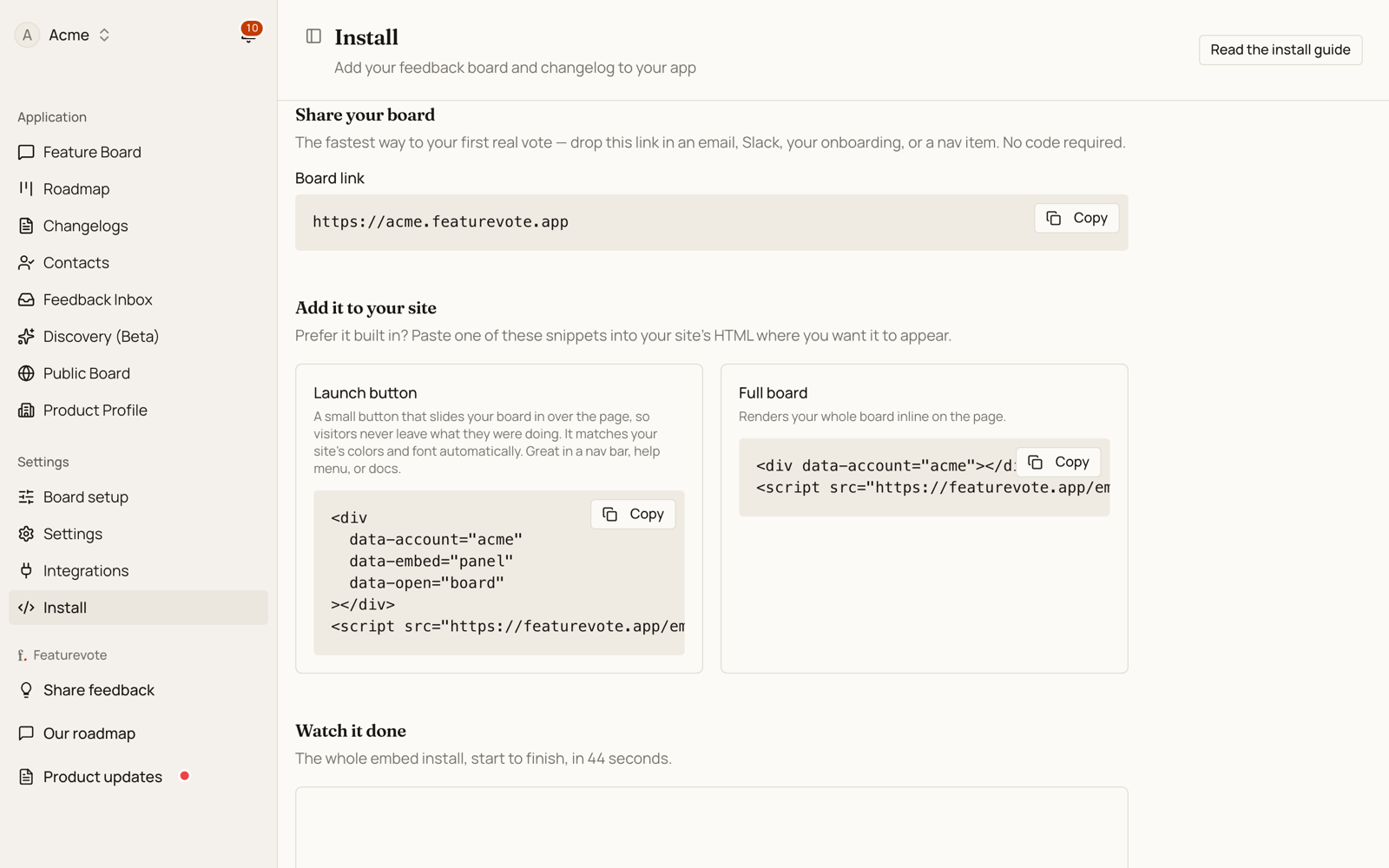
There are three ways to put FeatureVote in front of your users. Start with the link — it takes seconds and needs no code. You'll find copy-paste snippets for all three under FeatureVote → Install in your dashboard.
Prefer to watch it done? The whole embed install, in 44 seconds:
Option 1: Share a link (recommended)
The fastest way to collect your first vote. Copy your board link and drop it anywhere — an email, a Slack message, your onboarding flow, or a nav item.
https://your-account.featurevote.app
Point people at your product updates instead by adding ?tab=changelogs:
https://your-account.featurevote.app?tab=changelogs
Because it's just a link, you can build your own button or menu item and style it however you like — no widget required. To pre-fill the voter's identity, add query params (see Passing user identity below).
Option 2: Add a launch button
A small button that opens your board (or changelog) and shows a red dot when there's a new update. Paste it where you want it to appear:
<div data-account="your-account" data-embed="panel" data-open="ask"></div>
<script src="https://featurevote.app/embed.v2.js" async></script>
data-embed="panel" slides your board in over the page. A visitor halfway through writing something, or three levels into your app, can leave feedback and carry on — no page load, nothing lost. Use data-embed="launcher" instead if you'd rather send them to the board as a normal page.
Voting without leaving the page
The snippet above opens the feedback form on its own. Swap data-open="ask" for data-open="board" and the panel opens the board itself, so a visitor on your pricing page or in your app can read what others have asked for and upvote it in place, then carry on where they were:
<div data-account="your-account" data-embed="panel" data-open="board"></div>
<script src="https://featurevote.app/embed.v2.js" async></script>
Voting is a single click. It needs no account and no email unless you turn on Require email to vote in Settings → Board → Access. Posting a new request still asks the visitor for an email.
Keep data-embed="panel" either way. Without it the snippet renders the full board inline in the page instead (that's Option 3 below).
Launcher options
Add these attributes to the <div> to change what the button does and how it reads:
| Attribute | Values | Default | What it does |
|---|---|---|---|
data-embed | panel, launcher | — | panel opens the board in a slide-in drawer; launcher navigates to it. |
data-open | board, ask, changelogs | changelogs | What the button opens: the board, a quick "suggest a feature" box, or your product updates. Works on the full-board embed too (Option 3), where leaving it out keeps the board's normal view. |
data-label | any text | per mode¹ | Overrides the button text. |
data-target | _self, _blank | _self | Open in the same tab or a new tab. Ignored by panel, which opens in place. |
data-panel-side | right, left | right | Which edge the panel slides in from. |
data-panel-width | any CSS size | 420px | Panel width on desktop. Phones always get a full-screen sheet. |
data-dot-visible | false | shown | Set to false to hide the "new update" dot. |
data-email / data-name | a value | — | Pre-fills the visitor's identity (see Passing user identity). |
data-access-key | your access key | — | Required only if your board is set to Hidden (see Hidden boards). |
¹ The default label depends on the mode: Request feature (board), Suggest a feature (ask), View updates (changelogs).
How the panel behaves
data-open="ask"shows the form and nothing else — no board, no list of other people's requests. Visitors first pick what kind of feedback it is:- Suggest a feature or improvement → goes on your public board, where others can vote on it.
- Report a bug or issue → goes to your private Feedback Inbox. It never appears on the board and gets no votes.
If you've turned the Feedback Inbox off in Settings → Board, there's nothing to choose and visitors land straight on the feature form.
data-open="board"/"changelogs"show the board itself in the drawer, so people can read and vote on what's already there.Closing it: the ✕ in its header, a click on the dimmed page behind it, or the Escape key. After a successful submit the panel shows the confirmation and then closes itself. (In
data-open="board"mode, Escape works while focus is on your page; once the visitor clicks into the board itself, use the ✕ or the dimmed area.)It can't be covered or clipped. The panel renders in the browser's top layer, so your
z-indexvalues,overflow: hiddenwrappers andtransformed ancestors don't affect it — the button is safe to put anywhere, including inside your own modal.If your site sends a
Content-Security-Policy, itsframe-srcmust allowhttps://*.featurevote.app, or the panel will open empty. (The same applies to the inline board embed.)
You don't have to hand-write any of this. In your dashboard under FeatureVote → Install → More options → Customize the launch button, a visual editor lets you set the label, mode, and colors and copies the finished snippet for you.
Styling — it already matches your site
By default the launcher inherits your site's text color and font, so it blends in on light and dark pages with no styling needed.
The launcher renders inside an isolated shadow root. That means two things:
- Your page's CSS can't accidentally reach in and break the button — and the button's CSS can't leak out and affect your page.
- Because of that isolation, you can't style it with ordinary selectors. Instead, the launcher exposes two deliberate, stable hooks you're meant to target from your page's stylesheet.
Two ways to theme it — pick based on how far you want to go:
1. Colors only — the --fv-* custom properties. The quickest option. Set these on the container and they flow through the shadow boundary into the button. Good when you just want brand colors:
[data-account] {
  --fv-bg: #4f46e5;   /* button background */
  --fv-text: #ffffff; /* button text + icon */
  --fv-dot: #f59e0b;  /* the "new update" dot */
}
2. Full control — the ::part() selectors. The launcher tags its two inner elements as part="button" and part="dot", which you can style like any element — including states like :hover. Use this when you want to change shape, padding, radius, or anything beyond color:
[data-account]::part(button) {
  background: #4f46e5;
  color: #ffffff;
  border-radius: 9999px;
  padding: 10px 18px;
  width: auto; /* the default is a full-width row; opt into a compact button */
}
[data-account]::part(button):hover { background: #4338ca; }
[data-account]::part(dot) { background: #f59e0b; } /* the unread dot */
Theming the panel. The slide-in panel is a separate element that mounts itself on <body>, so it has its own hooks:
[data-featurevote-panel] {
  --fv-panel-width: 520px;                  /* desktop width */
  --fv-panel-bg: #ffffff;                   /* panel background */
  --fv-panel-text: #0f172a;                 /* header text */
  --fv-panel-backdrop: rgba(0, 0, 0, 0.6);  /* the dimmed page behind it */
}

/* …and ::part() for anything beyond color, as with the button: */
[data-featurevote-panel]::part(panel) { box-shadow: none; }
[data-featurevote-panel]::part(panel-close) { border-radius: 9999px; }
You can combine both — set the --fv-* colors and reach for ::part() only where you need more.
A note on shape: the default is a full-width row, designed to sit in a sidebar or nav column. For a compact inline button, set width: auto on ::part(button) as shown above.
Option 3: Embed the full board
Render your entire board inline — great for a help center, product portal, or internal dashboard.
<div data-account="your-account"></div>
<script src="https://featurevote.app/embed.v2.js" async></script>
Optional sizing:
<div
  data-account="your-account"
  data-width="100%"
  data-height="600px"
  data-border="1px solid #e5e7eb"
></div>
<script src="https://featurevote.app/embed.v2.js" async></script>
Any CSS size works (600px, 80vh, 100%), and embed.v2.js treats a bare number like 760 as pixels. (On the legacy embed.js, always include a unit.)
The full-board embed also honors data-open (on embed.v2.js). Set data-open="changelogs" to open the embedded board directly on your product updates — handy when the embed lives on a "What's new" page:
<div data-account="your-account" data-open="changelogs"></div>
<script src="https://featurevote.app/embed.v2.js" async></script>
Unlike the launcher, there is no default here: leave the attribute out and the embed opens on the board's normal view, exactly as before.
Passing user identity
If your app knows who the visitor is, pass their name and email so the feedback form is pre-filled.
On a link, add query params:
https://your-account.featurevote.app?email=jane@example.com&name=Jane%20Doe
On a launcher or board embed, add data attributes:
<div
  data-account="your-account"
  data-email="jane@example.com"
  data-name="Jane Doe"
></div>
<script src="https://featurevote.app/embed.v2.js" async></script>
Hidden boards
If your product is behind a login, you may not want your board on the open internet. Settings → Board → Access has four levels; these are the three that keep the embed working:
| Public | Unlisted | Hidden | |
|---|---|---|---|
| Your users, through the embed | yes | yes | yes |
| A stranger who has the link | yes | yes | no |
| Google and other crawlers | yes | no | no |
Public is the default. On Hidden, copy the access key from the same screen and add it to your embed:
<div
  data-account="your-account"
  data-email="jane@example.com"
  data-name="Jane Doe"
  data-access-key="k_7Qm2xR9vTb4Lp"
></div>
<script src="https://featurevote.app/embed.v2.js" async></script>
That is the whole integration. Nothing to generate per user, nothing that expires, no server code.
Checking it works
Open your board's own URL — https://your-account.featurevote.app — with no key on the end. You should get "This board is hidden". That is exactly what a stranger with the link sees.
The check is reliable from any browser, including the one you just tested your own site in: nothing is remembered between visits, so the board decides on the key in the URL alone every time.
Two things worth knowing before you rely on it:
- It stops strangers, not insiders. Anyone who can load your page can read the key in its source, and your own users can pass the link on. Use Regenerate on the access key if one gets out — the old key stops working within a few seconds, and you re-paste the new one.
- It hides the board page, not the data behind it. Someone who knows how the API works can still read a hidden board's contents. That is why it is called Hidden and not Private.
Frameworks (React, Vue, SPAs)
Load the script once in your root layout or document head, then initialize the container after it mounts:
import { useEffect, useRef } from 'react';

function FeatureLauncher() {
  const ref = useRef(null);

  useEffect(() => {
    const init = () => window.FeatureVote?.initEmbeds(ref.current);
    init();
    window.addEventListener('featurevote:embed-ready', init, { once: true });
    return () => window.removeEventListener('featurevote:embed-ready', init);
  }, []);

  return (
    <div ref={ref} data-account="your-account" data-embed="launcher" data-open="board" />
  );
}
The same pattern applies to Vue (template ref + onMounted) and other frameworks — call window.FeatureVote.initEmbeds(el) once the container is in the DOM.
Platforms (WordPress, Shopify, Webflow…)
Any platform that allows custom HTML works. Look for a "Custom HTML" or "Embed Code" block and paste the snippet. On WordPress you can pass the logged-in user's identity:
<div
  data-account="your-account"
  data-email="<?php echo wp_get_current_user()->user_email; ?>"
  data-name="<?php echo wp_get_current_user()->display_name; ?>"
></div>
<script src="https://featurevote.app/embed.v2.js" async></script>
Not sure which to use?
Start with the link — it's the fastest path to your first real vote. Add the launch button when you want a persistent entry point with the new-update dot, and embed the board when you want it inline on a page.