
Run a public known issues list for your users
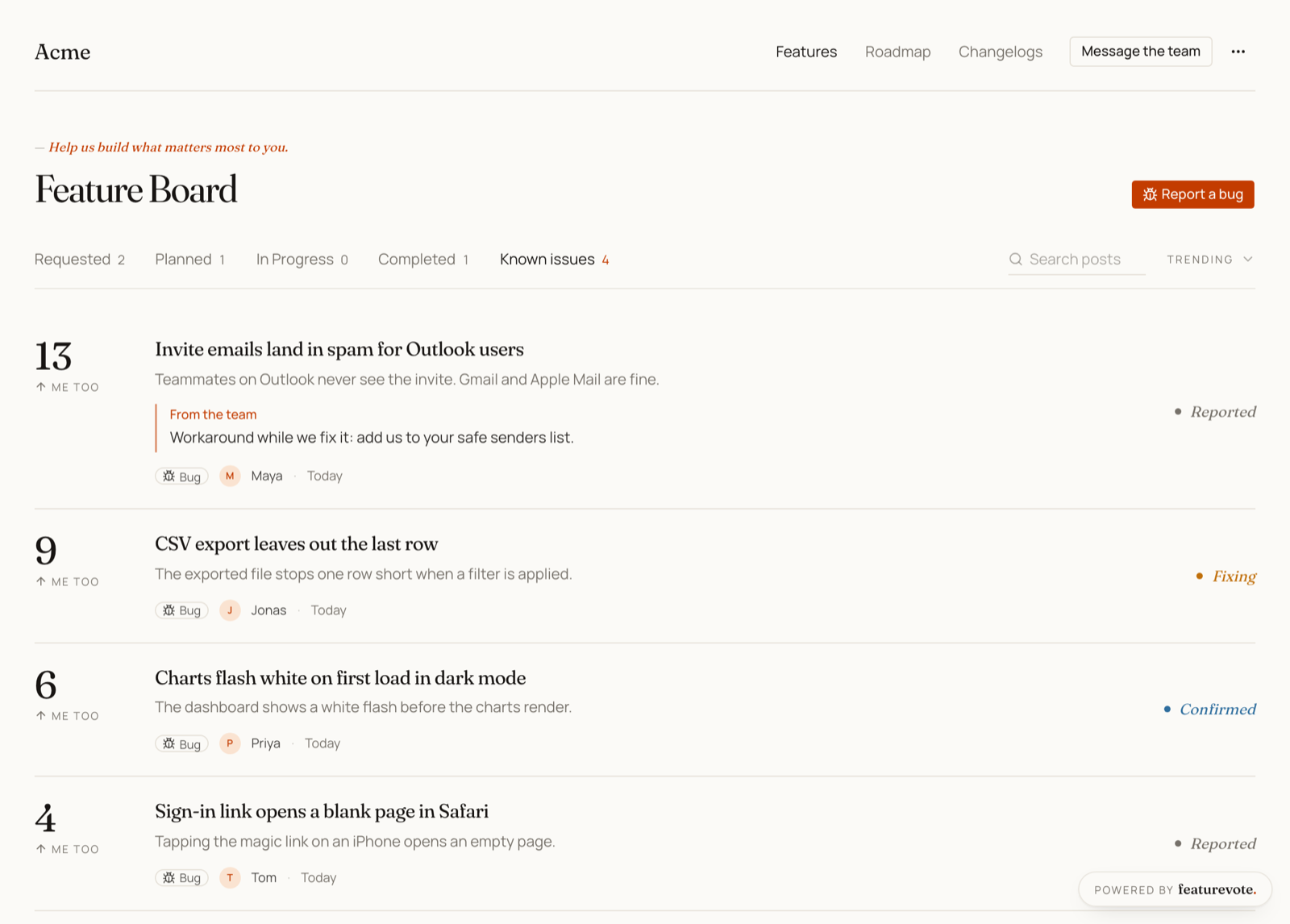
With Known issues on, Featurevote gives bugs their own tab. People say Me too instead of reporting again, and hear when it is fixed.
Known issues gives bugs a list of their own on your Feedback Portal. Visitors report a bug the way they post an idea. Anyone else who has it says Me too instead of reporting it again, and everyone who had it gets an email when you mark it fixed.
Turn it on
Open Settings → Portal features and find the Known issues card. Switch on Show known issues and save. It's off by default, and it's there on every plan.
Reporting a bug
With Known issues on, the post form has two tabs at the top, Post an idea and Report a bug. A bug report asks What went wrong?, and its button reads Report bug.
On the Known issues tab, the button across from the board title reads Report a bug and opens the form on that tab. Elsewhere on Features, and on the Roadmap, it reads + Post an idea.
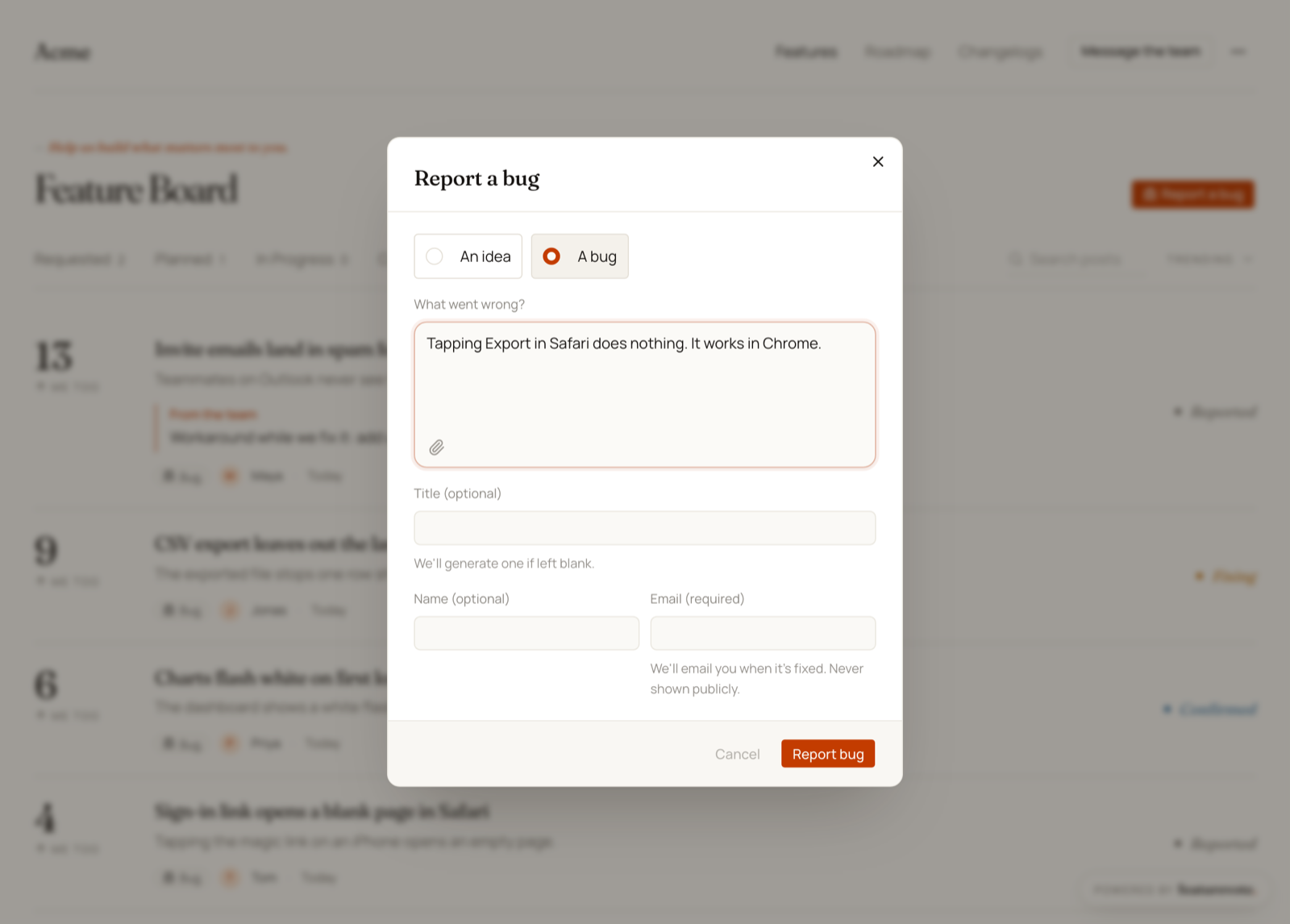
The similar requests check still runs, and it compares a bug only with other bugs. When it finds a match, the reporter can say Me too on that one instead of posting it again.
If you approve posts first, a bug shows up once you approve it.
The Known issues tab
Your Feedback Portal gets a Known issues tab after Completed. A bug stays there from the moment it's reported until it's fixed. Then it moves to Completed, next to the ideas that shipped.
Requested, Planned and In Progress stay about ideas, and bugs stay off the public roadmap. Search still finds everything, bugs included.
- Each bug has a small Bug tag, and people vote on it with Me too. It counts like any other vote.
- A bug's stage reads Reported, Confirmed, Fixing or Fixed. See Stages.
- An empty tab says Nothing we know of is broken, with a Report a bug button under it.
Stages
A bug uses the same statuses as an idea. Your Feedback Portal shows them under bug names, and your dashboard keeps the usual ones.
| In your dashboard | On your Feedback Portal |
|---|---|
| Requested | Reported |
| Planned | Confirmed |
| In Progress | Fixing |
| Done | Fixed |
Opening a bug shows the four stages as a track, with the current one marked. Not Planned works the same as for an idea, and the bug leaves the board.
Workarounds
A request's Team update is where a workaround goes. On an idea it shows when someone opens the post. On a bug it also shows on the card itself, under From the team, so people see it without opening anything. Write it in the request's edit dialog.
When a bug is fixed
Mark the bug Done as usual. With Notify Voters ticked, the email goes out on the same terms as for an idea. It reaches the reporter and everyone who said Me too, as long as they left an email, and your plan's email limit applies. For a bug the email says Fixed, and its subject reads Fixed - "…" instead of Completed - "…".
A release note you write when completing it shows on the bug under Fixed. The preview image people see when the bug's link is shared says Fixed too.
Re-filing a request
Open any request's edit dialog and pick Idea or Bug under Type. Use it when someone posts a bug as an idea, or the other way round.
In your dashboard, bugs sit in the same list and roadmap as ideas, so the edit dialog is where you see a request's type.
Linking to it
Add ?tab=issues to your board link to open the Known issues tab directly, from a help center page or a Discord channel for example.
https://your-account.featurevote.app?tab=issues
The embed shows Known issues too:
- Board in the page shows the full board, with the Known issues tab and Report a bug.
- The slide-in panel folds the tabs into one status menu, where people can find a bug and say Me too. Its feedback form posts ideas.
data-openhas no Known issues value of its own.
Turning it off
Switching Show known issues off hides nothing. Bugs go back to reading like ordinary requests, in the usual tabs and on the roadmap, with a Vote button and the usual status names. A fixed one's email says Completed. Every request keeps its type, so switching it back on brings the tab back as it was.
Known issues and private messages
The two settings do different things.
- Known issues is public. Everyone sees the list, can say Me too, and hears back when a bug is fixed.
- Private messages, in the Feedback card, stay between the visitor and your team. The setting adds Get help to your Feedback Portal's header and to the embed's feedback form, and the messages land in your Feedback Inbox. Nobody else sees them.
They work side by side. A bug other people can run into fits Known issues. Something about one person's account, or anything that shouldn't be public, fits a private message.